Overreaching is how students get ahead.
Reaching beyond what's expected.
Every student can work above grade level. We plan for it. Presumptuous Learning assesses every subject in a student's Ontario curriculum, plans each day one level higher, teaches until each skill is mastered, and gives every student a business and a give-back project to launch by May. Families see it all, every week.
What students, coaches and families see
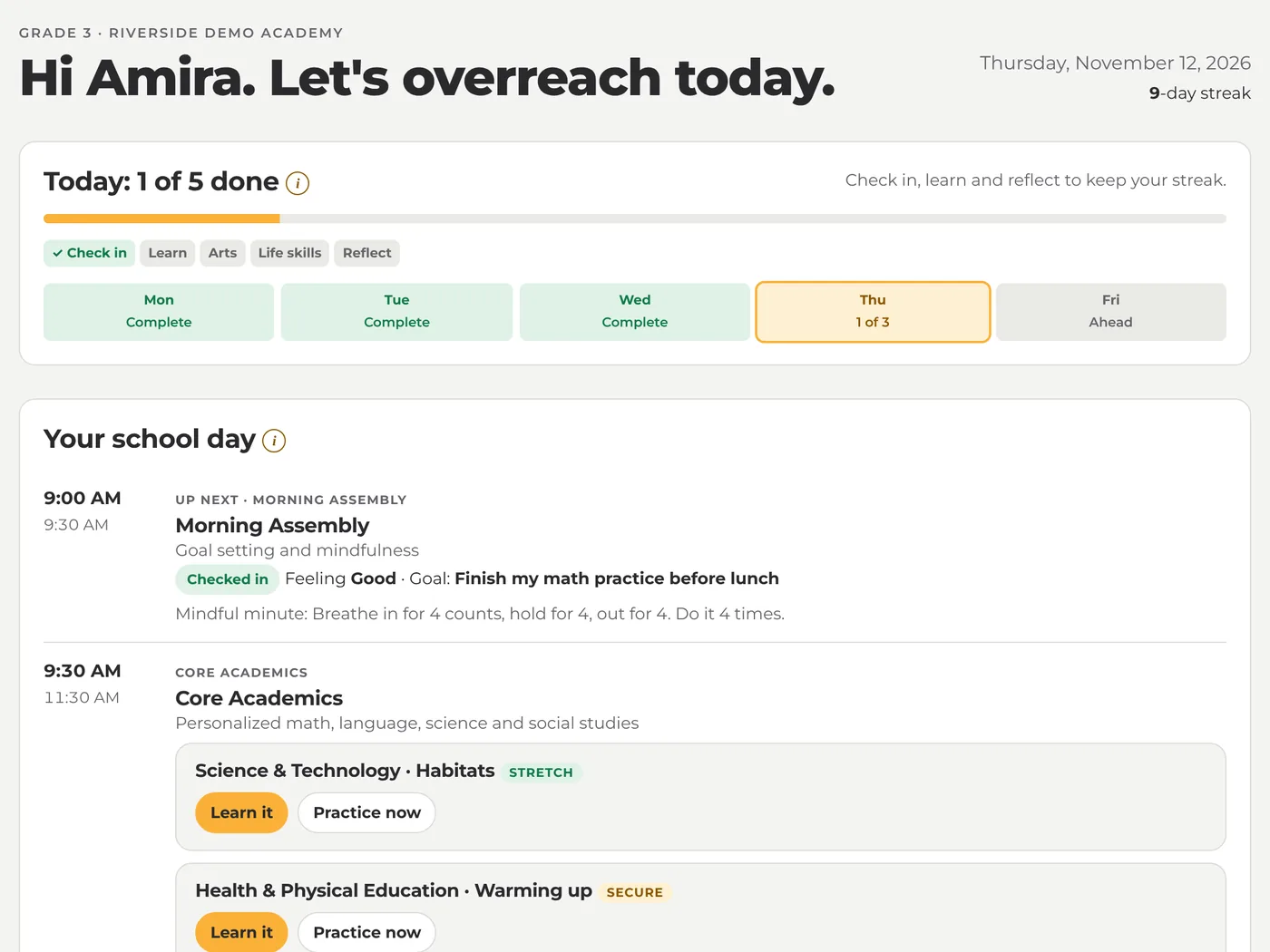
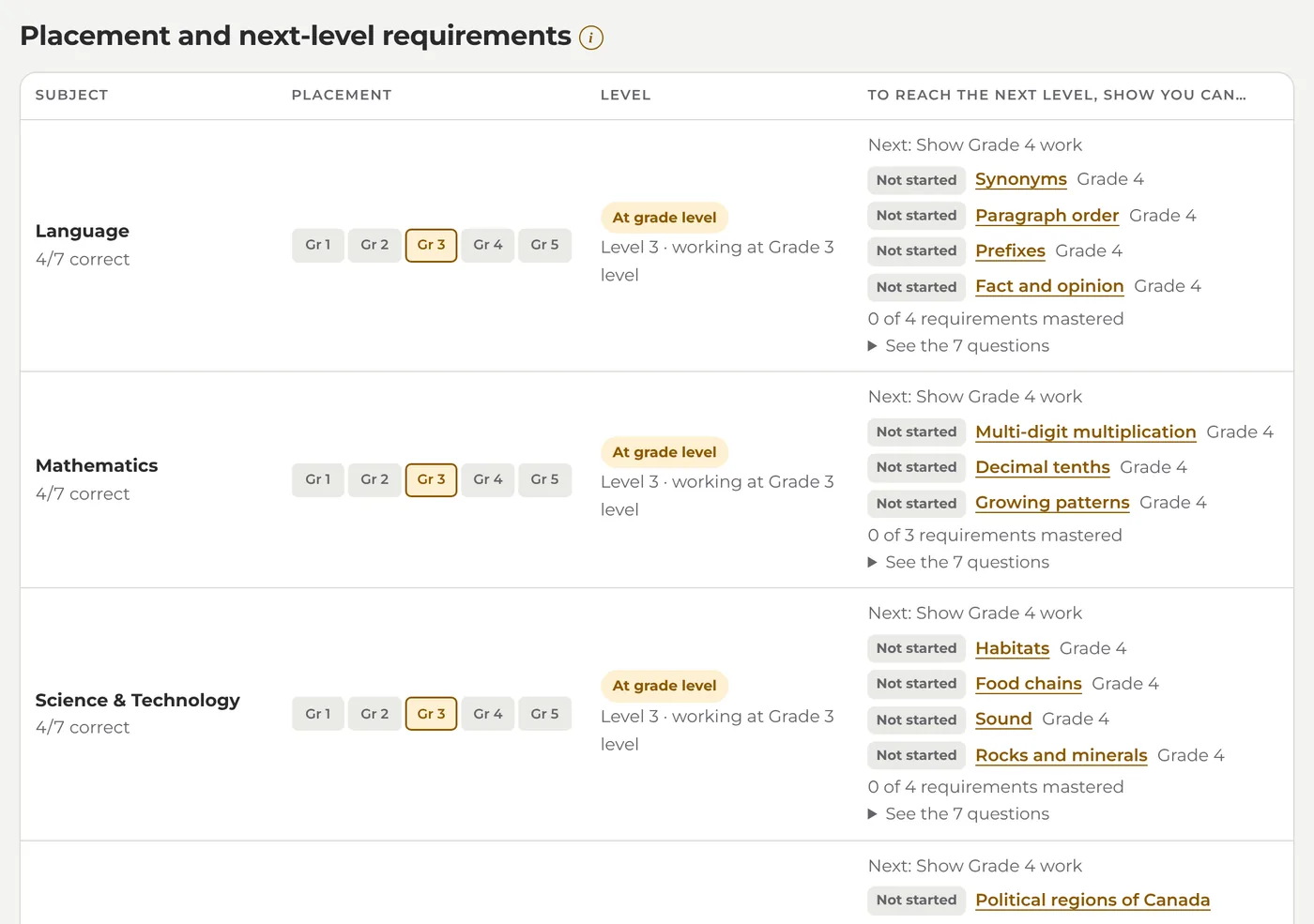
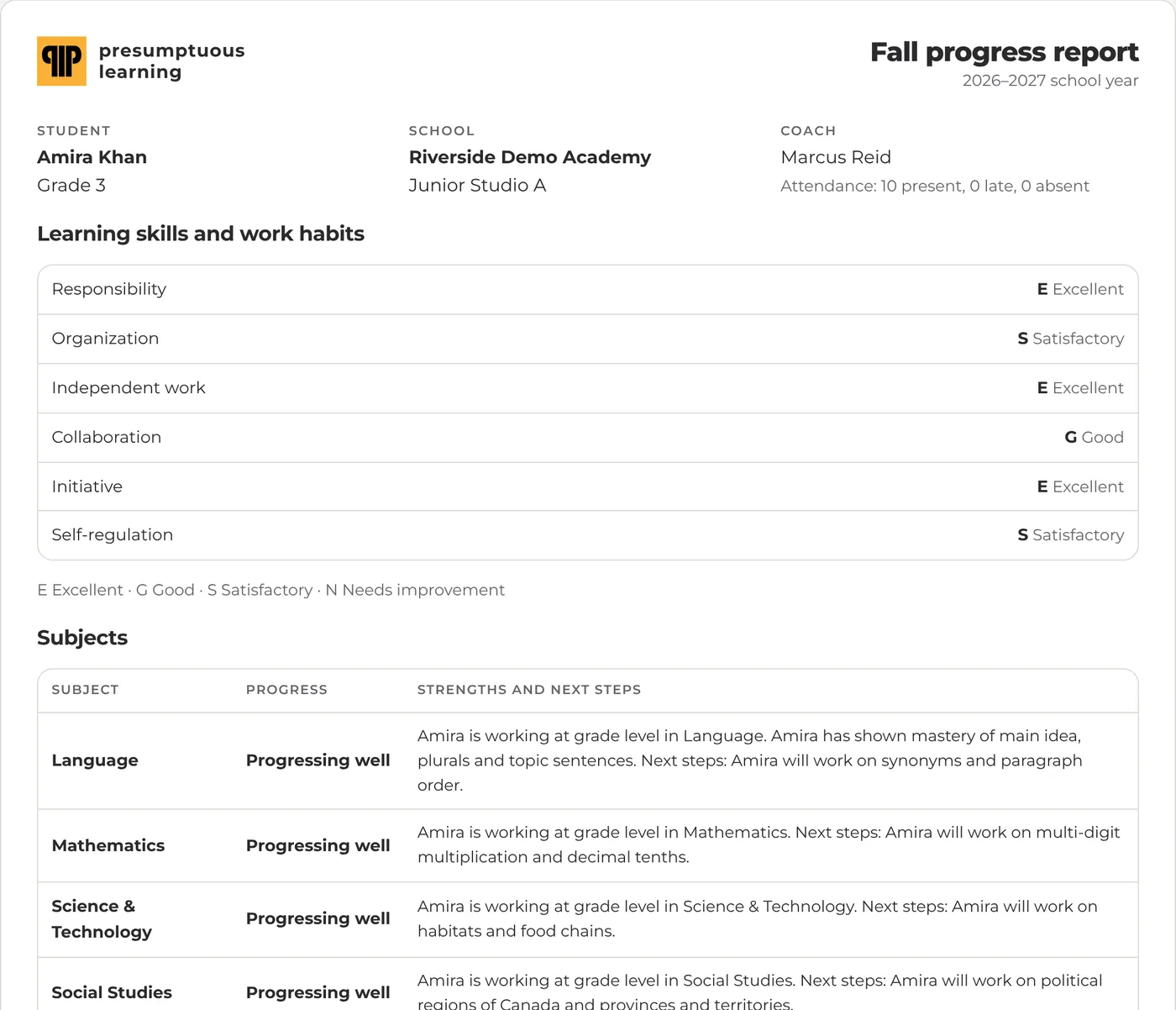
Screens from our demo school. Names are made up.
From placement to Launch Day
Assess
An adaptive placement in every subject of the student's Ontario curriculum finds the level they really work at: below, at or above grade.
Plan
A plan for today, this month and the school year, aimed one level higher than where the student is now.
Learn and master
AI lessons teach each skill, then a mastery check tests it. Miss it and the lesson is taught again a different way, until they get it.
Build
Every student runs a Presumptuous Project (their own business, with business and life skills lessons every month) and a Purpose Project (a community give-back), September to June.
Show
Students present on Launch Day in May. Families follow along every week and get report cards in Ontario's format.
Your plan. Your streak. Your business. Your Launch Day.
Every morning you check in and set a goal. You learn what's next for you, not what's next for everyone. Get it right and you move up; miss it and you get it explained a new way. And by May, you've started something real.
Know where your child is, every week
Every subject, in plain words
Where your child is (below, at or above grade level) and the exact skills they're working on next.
A Friday email
Days completed, skills mastered, project steps and notes from their coach. One click to stop it.
Report cards
A fall progress report and two report cards a year, in Ontario's format, ready to print.
Free, and you're in control
Families never pay. You give or withdraw consent for AI features and can download your child's data any time.
Your child's school gives you a family code. Use it to create your account.
For coaches and school leaders
We call the adults who work with students coaches: your teachers, ECEs and support staff. The platform does the planning and first teaching so they can coach.
Coaches
- Who needs attention today, at a glance.
- Assign skills, practice or a reassessment to one student or the class.
- Feedback on studio work and project milestones, and report cards half-written for them.
School leaders
- Placement across the school by subject and grade.
- Your timetable and calendar drive every student's day.
- Licences, seats and invoices in one place, plus audit log, consent records and data exports.
Follows your timetable, September to June
Each student's Today screen follows your bell schedule and school calendar: morning check-in, core academics from their plan, the Presumptuous Project, arts in the studio, and an end-of-day reflection. By default students spend 10 hours a week on academics and 8 on their Presumptuous Project. PA days, holidays and breaks come from your calendar, with the Ontario template built in.
Until they get it
When the plan says a student needs a skill, the platform teaches it with a short lesson at their level, checks it with five questions, and reteaches it a new way if they miss. Coaches are told when a student is stuck after three tries.
Every student launches something real
Presumptuous Project
A real business the student designs, tests with customers and launches. Every month brings two business skills and one life skill, from pricing and profit to pitching and resilience, taught with lessons and mastery checks and used straight away on their own business.
Purpose Project
A community impact project: a cause they care about, a partner, a plan, and numbers that show what changed.
An AI discovery interview helps each student find a project that fits them. Nine milestones run from September to June, each reviewed by a coach, with presentations on Launch Day in May. We start younger than the Ontario curriculum: Kindergarten to Grade 2 already meet price, cost and profit at a lemonade stand. Each unit is tied to Ontario math and language expectations, such as financial literacy, data and oral communication, so the time counts toward academics too.
Built for school boards' questions
Parents in control
Consent for the platform and for AI features, given and withdrawn by parents, with paper consent recorded by the school.
No names to the AI
The tutor sends only the question, the choices, the student's answer and grade. AI features stay off without consent.
Every view logged
An audit log of who viewed which student's records, plus data exports and permanent deletion on request.
What schools and parents ask us
Does it replace teachers?
No. We call the adults who work with students coaches: your teachers, ECEs and support staff. The platform does the assessing, planning, first teaching and checking, so coaches can spend their time with the students who need them most.
Does it follow the Ontario curriculum?
Yes. Every grade from Kindergarten to Grade 12 is assessed in the subjects of the Ontario curriculum, results use the achievement levels 1 to 4, and report cards follow the provincial format: progress words in the fall, letter grades for Grades 1 to 6, percentages from Grade 7, and the six learning skills.
How much time does it take each day?
It fits the timetable you already have. The plan fills your academic blocks in short pieces: a lesson with a 5-question check, or a 5-question practice set. Students check in each morning and reflect at the end of the day. By default the week holds 10 hours of academics and 8 hours of Presumptuous Project time, with the business lessons tied to Ontario math and language expectations.
What devices does it need?
Any device with a web browser: Chromebooks, iPads, laptops or phones. Nothing to install. Young students can sign in by holding up a printed QR card to the camera.
How is AI used, and is it safe?
AI writes the lessons for each skill and, if your school switches it on, short explanations of wrong practice answers. It never receives a student's name. Schools can require a parent's consent first, and every view of a student's records is logged.
What does it cost?
Schools pay one price per student per year, with every feature included. Coaches, parents and admins are free, and families never pay. Every school starts with a 90-day pilot.
One price per student, per year
Every feature is included. Coaches, parents and admins are free, and families never pay. Every school starts with a 90-day pilot.
- Adaptive placement, K–12
- Daily, monthly and yearly plans
- AI lessons and mastery checks
- AI tutor (optional)
- Your bell schedule and calendar
- Studio and portfolio
- Presumptuous and Purpose Projects
- Business & life skills strand, K–12
- Launch Day showcase
- Ontario-format report cards
- Weekly parent email
- QR sign-in cards for young students
- Sign in with Google or Microsoft
Try it with your students for 90 days
Tell us about your school. We'll set up your school, timetable and calendar, and help you add your first classes.